
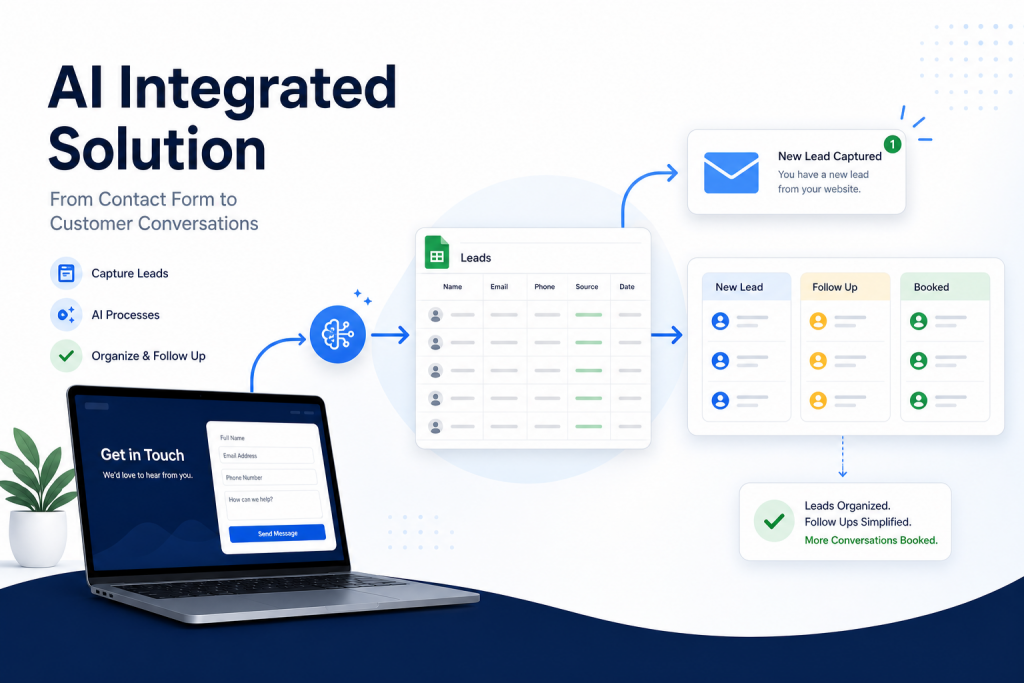
Website contact form automation helps small businesses capture inquiries, organize leads, send alerts, and follow up faster without extra admin work.
When someone fills out a contact form on your website, that moment matters. They are interested enough to ask a question, request help, or share a business problem. But if that form submission only sends a basic email notification, it is easy for the lead to get buried in an inbox.
Website contact form automation gives small businesses a simple way to capture new inquiries, organize them in one place, and start the follow-up process without relying on memory or manual copy-and-paste work.
What is website contact form automation?
Website contact form automation is the process of connecting your website form to the tools you already use, such as email, Google Sheets, a CRM, or a task list. Instead of a new inquiry sitting in one inbox, the lead can be logged, labeled, summarized, and routed to the right next step.
A simple automated contact form system can:
- Capture the person’s name, email, phone number, company, and message
- Add the lead to a Google Sheet or lightweight CRM
- Send an internal alert to the business owner or team
- Send a polite confirmation email to the lead
- Mark the lead status as New, Follow Up, or Booked
- Create a clear follow-up trail so opportunities do not slip through the cracks
Why small businesses lose leads from contact forms
Most small businesses do not lose leads because they do not care. They lose leads because the process after the form submission is too manual.
Common problems include:
- The notification email goes to one person and gets missed
- There is no central list of new leads
- The business owner has to copy information into a spreadsheet later
- No one knows whether the lead was followed up with
- Responses depend on whoever checks the inbox first
- After-hours inquiries wait too long before getting a reply
Automation does not need to be complicated to fix these issues. Even a basic contact form workflow can make the business look more responsive and organized.
A simple contact form automation workflow
A practical workflow can be built in a few steps:
1. Capture the inquiry
The website form collects the information your team needs to respond well. At minimum, this usually includes name, email, phone number, company, and a short description of what the person needs help with.
2. Log the lead in one place
The form submission is automatically added to a spreadsheet or CRM. This gives the business one reliable place to review new opportunities instead of searching through inboxes.
3. Send an internal alert
The owner or team receives an email notification with the lead details. This alert should include the contact information, message, source, and suggested next step.
4. Confirm receipt to the lead
The lead receives a simple confirmation email letting them know the request was received. This does not need to be fancy. A fast, professional response builds trust and sets expectations.
5. Track the follow-up status
Each lead should have a status such as New, Contacted, Follow Up, Booked, or Closed. This makes it easier to see what needs attention without guessing.
What to include in your lead tracking sheet
If you are starting with Google Sheets, keep the structure simple. A useful lead sheet might include:
- Date received
- First name and last name
- Email address
- Phone number
- Company or business name
- What they need help with
- Lead source
- Status
- Summary
- Follow-up notes
- Next action
This kind of simple structure is often enough for a small business to get control of follow-up before investing in a more advanced CRM.
Where AI can help
AI can make contact form automation more useful by turning messy form messages into clear summaries and next steps. For example, a lead might write a long message about missed calls, slow response times, and wanting a better intake system. AI can summarize that into a short note like: “Needs help organizing new inquiries, improving response time, and setting up automatic follow-up.”
That summary helps the business owner understand the opportunity faster. It can also make internal notifications more useful, especially when leads come in after hours or during a busy day.
Keep the automation practical
The best automation is not always the most complex automation. For many small businesses, the first goal is simple:
- Never miss a new website inquiry
- Respond faster
- Keep lead details organized
- Know what needs follow-up
- Reduce repetitive admin work
Once that foundation is working, the system can grow into appointment reminders, missed-call text back automation, lead scoring, CRM updates, or more advanced email follow-up.
Related guides: what should happen after a new lead comes in, simple lead status tracking, and email follow-up automation for small business.
Final thought
Your contact form should do more than send a notification. It should start a reliable follow-up process. With a simple website contact form automation system, small businesses can capture inquiries, organize leads, send faster responses, and turn more conversations into booked opportunities.
Need help setting this up? AI Integrated Solution helps small businesses build practical automation systems for lead capture, follow-up, Google Sheets tracking, and everyday workflows. Contact us here to talk through what your business needs.